Skip to main content High Contrast Accessibility Feedback

YOUR IDEA. YOUR EVENT. YOUR TICKET SALES.

Create your event with AI. Start selling in minutes.

Tell Ticketor what you have in mind. Turn your idea into an event page, ticket options, a seating chart and artwork — with AI to help and you in control.

Type it or say it. Review the details. Make it yours.

From an idea to an event
YOUR PROMPT

A jazz night at Harbor Hall. Friday at 8 PM. General admission $25, VIP $40. Make it warm, intimate and a little retro.

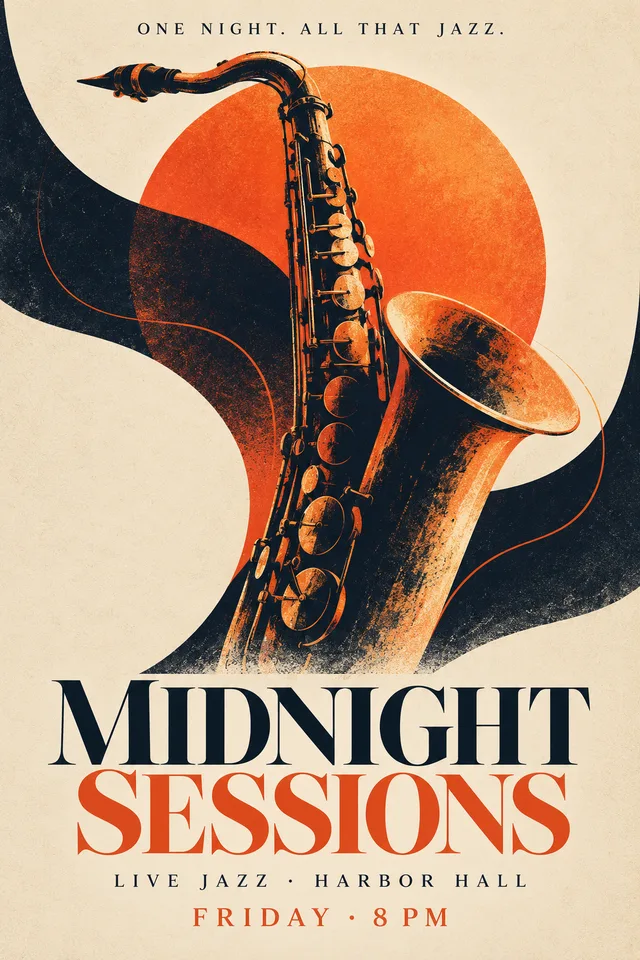
AI-generated Midnight Sessions jazz flyer with an orange sun and a saxophone.
YOUR EVENT, TAKING SHAPE

Midnight Sessions

Live jazz. Good company. A night to remember.

◷ Friday · 8 PM⌖ Harbor Hall
General admission$25
VIP$40
Ready for your review
Illustrative example. You review and confirm before creating your event.
Speak or type your idea General admission or reserved seats Edit and fine-tune anytime

AI SEATING CHART GENERATOR

A few words. A room full of possibilities.

Describe your seating layout or upload a venue chart. Get an editable seating chart, then verify the seats and assign your ticket prices.

01 / YOUR STARTING POINT

Describe the room.

10 round tables of 12 seats in 2 rows, with the stage at the bottom.

Table count, seats per table, arrangement and stage position. Just tell AI what you need.

Build my event with AI
02 / YOUR EDITABLE SEATING CHART
10 round tables, 120 seatsTwo rows of five round tables, each with twelve seats. The stage is centered at the bottom.12345678910STAGE
10 tables12 seats each120 seats
Animated illustration of the workflow. Review your generated chart in the seating chart designer.

AI gives you a head start. Ticketor's seating chart designer gives you control over the finished layout. Explore the seating chart designer

MORE THAN A STARTING DRAFT

The words. The look. The tickets.

Bring your event together without jumping between separate writing, design and ticketing tools.

AI EVENT DESCRIPTION GENERATOR
YOUR DIRECTION

“Make it feel like an intimate jazz club. Mention the live quartet and the VIP tables.”

YOUR DESCRIPTION

Set the scene before the first note.

Step into an evening of live jazz at Harbor Hall. Settle in with our quartet, or make the night your own with a VIP table close to the music.

Find the right words, faster.

Give AI your details and direction. Write a first description, polish your existing text or try a different tone. Review, edit, regenerate or undo AI changes.

AI EVENT FLYER MAKER
Example AI flyer for Midnight Sessions: a vintage jazz poster in orange and midnight blue.“Warm, intimate, a little retro.”

Give your event a look of its own.

Describe your vision and generate an event flyer using your event information. Review the artwork before using it, or upload a finished flyer and keep it exactly as it is.

AI-ASSISTED EVENT SETUP
YOUR PLAN

“General admission $25. VIP $40. Student tickets $15.”

General admission$25
VIP$40
Student$15
Illustrative ticket prices

Make the details work together.

Work through the title, venue, date, duration and ticket options in one guided conversation. Set price levels, variations and service fees, with a preview as your event takes shape.

FROM FIRST PROMPT TO FIRST TICKET

Describe it. Make it yours. Start selling.

  1. Tell us about your event.

    Start with a sentence or all the details. Type or speak, and let AI guide you through what is missing.

  2. Review and fine-tune.

    Check dates, prices, descriptions, artwork and seats. Edit with AI or continue in the manual editor.

  3. Open your ticket sales.

    Confirm your event, complete your account and payment setup, then share your event link and start selling.

AI STARTS IT. TICKETOR RUNS IT.

A faster start. A full ticketing platform.

Your AI-created event belongs to the same Ticketor system that handles the rest of your event business.

The right ticket for every guest

General admission, reserved seating, table seating, price levels, variations and promo codes.

Seating and ticket options

Keep the door moving

Deliver e-tickets and scan barcodes or QR codes for admission using a phone or supported scanner.

E-tickets and check-in

Keep your audience connected

Use newsletters, mailing lists, coupons and marketing tools alongside your event ticket sales.

Event marketing tools

A FEW THINGS TO KNOW

Questions about AI event creation?

You bring the event. AI helps with the setup. You make the final call.

View ticketing plans and pricing
How do I create an event with AI?

Start with what you know: your event idea, date, venue and ticket prices. Type or speak your details, then answer the AI event creator's follow-up questions. Review your event, choose your ticket options and confirm when you are ready to create it. Finish your account and payment setup before selling tickets.

Can AI generate a seating chart from a description?

Yes. Describe your tables, rows, seats, sections and stage position. For example: 10 round tables of 12 seats in 2 rows, with the stage at the bottom. Ticketor builds an editable seating chart for your venue. Verify the layout and fine-tune it in the seating chart designer before assigning ticket prices.

Can I upload a PDF or image of my venue's seating chart?

Yes. Upload a clear seating-chart PDF or image for AI analysis. Ticketor uses the readable sections, rows and seat numbers to build an editable chart. If details are unclear, it may ask you to clarify them. Always check seat counts, numbering, orientation and spacing against your original.

Does Ticketor support general admission and reserved seating?

Yes. Create general admission tickets, assigned-seat events or table seating. Set different price levels and ticket variations, and assign prices to the seats or sections you want to sell. Ticket buyers can choose seats from your interactive seating chart.

Can AI write my event description and make a flyer?

Yes. Use your event information and your own instructions to draft or polish the description. You can edit the text, ask AI to try again or restore the original text with Undo AI changes. Describe the artwork you want to generate an event flyer, or upload an existing flyer and use it as is.

Can I edit the event or seating chart after AI creates it?

Yes. You stay in control. Review the AI suggestions, change the details and continue in Ticketor's manual event editor whenever you need to. Open the seating chart designer to verify and fine-tune your venue layout. AI can make mistakes, so review all generated details and artwork.

Where can I find ticketing fees and plan details?

See Ticketor's pricing page for current ticketing fees and plan details. Payment-processing fees depend on your selected processor.

YOUR NEXT EVENT STARTS WITH AN IDEA

Let's put yours on sale.

Create your event with AI, make it your own and give your audience something to look forward to.

Ticketing and payment-processing fees follow your plan and processor.


Learn everything about selling tickets online Successful online ticket sales on Ticketor

Talk naturally and ask questions

Explore Ticketor’s features, pricing, and options for your events.

ChatGPT Voice button

Open ChatGPT and send the prepared message. Sign in to ChatGPT for free, then select Voice to talk naturally and ask questions.

Open ChatGPT

ChatGPT is an independent AI and may make mistakes; verify important details with Ticketor.